Capture Deep Blue Skies with your Canon T2i

By   |  Reward me
|  Pin this  |  Share this

Howdy! I ran across a cool little trick for all my T2i friends out there. If you’re looking for a quick way to get deeper blue skies and more cloud detail, then this tip is for you…
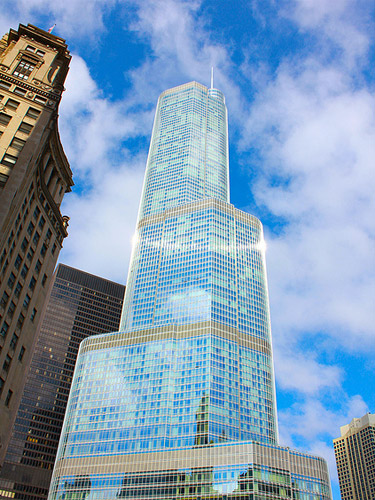
Taken with the Canon Rebel T2i | Photo by Ben

The Canon T2i offers multiple picture styles that can be customized to your liking. They can be found by pressing the picture style button (downward arrow)…
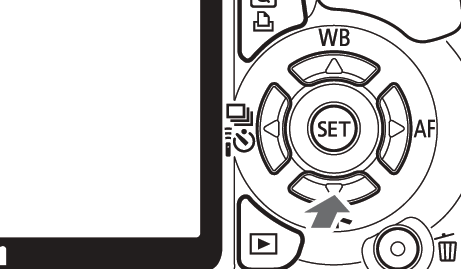
Now in order to edit the picture styles to your liking, you’ll need to access the setup menu…

  1. Locate the ‘Picture Style’ options (page 91 of the Canon T2i manual)
  2. Select the ‘Standard Picture Style’
  3. Press the ‘DISP.’ button
  4. Go down to the ‘Contrast’ option and press ‘SET’
  5. Move the arrow to the left so that you have -4 Contrast

The -4 Contrast option is the FASTEST and EASIEST way to get deeper blue skies and more cloud detail.

If you’re looking for even deeper blue skies or more cloud detail, then try…

  • Using a Circular Polarizer – Attaching a circular polarizer to your lens will give you more control over the amount of saturation in the sky.
  • Shooting in RAW – RAW format is intended for advanced users, but it allows you to fine tune the level of sky detail in post processing software.

Hope you enjoyed this T2i tip-torial…happy shooting!

P.S. You can reward me by using your shutter clicking skills on the Google +1 button. In return, I'll cook up more tips and tricks to share with you. Thanks for your support! :)
Add a Comment or Ask a Question
Got questions about lenses, gear or recommended settings for your Canon T2i? Well, good news! You can connect with me (Moose) right now and get answers...
Post it to the T2i Forum Start a new topic or post a comment to a current thread and I'll get back to you lickety split.
Ask me stuff on Google+ Just type +Moose Winans into your Stream box along with your comment or question.
Ask me stuff on Facebook Just click the Like button on my facebook page and then post a comment or question to my wall.
Ask me stuff on Twitter Just start your tweet with @MooseWinans followed by your comment or question.


14 Responses to “Capture Deep Blue Skies with your Canon T2i”

  1. Ryan says:

    Moose,
    I saw that you mentioned that a wide angle lense would be great for sunsets and such. What wide angle lense would work well for a relatively cheap price? like maybe one that has great quality for under $300???Thanks

    -Ryan

    • Moose says:

      Ryan,

      Wide-angle lenses are very expensive. If your budget is limited to $300 you might be able to find a used Sigma 10-20mm f/4-5.6 on eBay or craigslist for around $300 to $400 bucks which will allow you to capture a very wide field of view (great for landscapes, sunsets, cityscapes, architecture, etc…).

      - Moose

  2. Angela says:

    Hi. I’m a super beginner with my camera. I followed the steps but when I press the display button everything just blanks on the screen. How am I supposed to change the contrast?

    • Moose says:

      Angela,

      Not sure why the screen is blanking out…what mode do you currently have the T2i set to?

      - Moose

    • Kahlil says:

      That would be because you are not in the picture style setting.
      All you have to do is click the Menu button, Go to the second menu then go to the very bottom, click there then follow the instructions above.

    • Moose says:

      Kahlil,

      Thanks for sharing…it’s greatly appreciated.

      - Moose

  3. KC says:

    What are some of your personal custom settings for capturing the best quality images in: outdoors, indoors and lowlight?

    • Moose says:

      KC,

      It all depends on the lighting and the subject. Generally speaking I shoot in aperture priority mode (Av). When shooting portraits I’ll select a small aperture f/number to shorten the depth of field which makes the subject pop off a smooth background. When shooting group shots, I’ll raise the aperture f/number to f/4 to get everyone in focus. For landscapes/cityscapes, I’ll increase the aperture f/number to f/11 to bring the entire scene into focus.

      For fast moving subjects, I’ll switch over to shutter priority mode (Tv) and select a shutter speed around 1/500 to 1/1000. When I want to capture movement like light trails or moving water, I’ll slow the shutter speed down to a few seconds.

      If you’re new to digital photography, I highly recommend getting Scott Kelby’s digital photography books (see here. The books offer beginners tips to many different shooting situations. The tips are written in a one page format, so you don’t have to read entire chapters. Happy shooting!

      - Moose

  4. Ray Masiclat says:

    What would be a good lens for taking pictures of the moon, stars, Sunset etc……that’s not to expensive.

    Thanks, Ray

    • Moose says:

      Ray,

      For shots of the moon, most people go for a telephoto lens. For stars and sunsets, a wide-angle lens would suit you well. You can either get two lenses, one for wide-angle shots and one for telephoto shots or you can get an all-in-one lens that allows you to zoom from wide-angle to telephoto all with one lens.

      The two lens setup, would be cheaper. The T2i kit comes with the 18-55mm lens, so all you would need is the Canon 55-250mm lens to get telephoto shots of the moon.

      There are a few all-in-one lenses available, but I like the Tamron 18-270mm lens for it’s sharpness and overall performance.

      - Moose

  5. Greg says:

    Love your site! Just a question on low light indoors. I have a restaurant and there is a lot of mohogany wood and mirrors. I have the canon 50mm 1.8 lens and canon 18-135 3.6 lens. I’m looking to take pictures indoors. What would be a great lense to work with? I believe a wide angle would be sufficient since the rooms are small.

    Thank you,
    Gregory

  6. Diego says:

    Can I obtain the same results of this post simply by just shooting in raw? Thanks!

    Diego

    • Moose says:

      Diego,

      Yes, in fact I mentioned that towards the end of the post. For some beginners, shooting in RAW and converting the image in post processing software is a bit tedious. The contrast adjustment would give them instant results. Happy shooting!

      - Moose

Leave a Reply