Continuous Shooting Tips for the Canon SX210 IS
By   |  Reward me
|  Pin this  |  Share this

Learn how to enable and use continuous shooting mode on the Canon SX210 IS. Plus, tips for tracking subjects during a continuous burst.

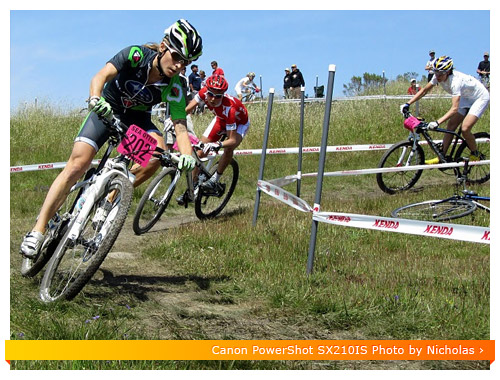
Canon SX210 IS Continuous Mode - Bicycling

Jump to a section below using the following links:

How to enable Continuous Shooting on the SX210 IS

Enabling the continuous shooting mode on the SX210 IS is actually quite easy.

  • The default setting on the SX210 IS is single shot mode, so if you’d like to switch to burst mode just click the FUNC/SET button on the back of the camera
  • Next rotate the dial to the rectangle shaped icon and click the FUNC/SET to enter the continuous shooting mode options
  • Select one of the options for continuous shooting

Canon SX210 IS Continuous modeRegular Continuous Shooting Mode – In this mode the SX210 IS will capture 0.7 frames per second or 1.4 frames every two seconds. The SX210 IS will lock the focus and exposure when you half press the shutter button, so keep that in mind when using this mode. If the subject is moving towards or away from you, then I suggest you switch over to Continuous Shooting with auto-focus (AF).

Canon SX210 IS Continuous AF modeContinuous Shooting with AF – In this mode the SX210 IS will capture 0.5 frames per second or 1 frame every two seconds. It’s a little bit slower than the regular continuous mode, but the advantage is that it will refocus before each capture. This is helpful when the subject is moving towards or away from you.

Canon SX210 IS Continuous LV modeContinuous Shooting with LV – This mode will only show up when shooting in Fireworks mode or when using the manual focus. It captures 0.5 frames per second or 1 frame every two seconds. The focus is locked on the manual focus point.

When to use Continuous Mode on the Canon SX210 IS

Most people assume that continuous mode (burst mode) is only good for shooting sports, however, there are many other situations where continuous mode can lead to some amazing photos…

Portraits – Instead of counting to three and taking one picture at a time, activate continuous mode and and capture everything before and after the smile. Some of the best portraits are when your subject has no idea you are taking the photo. For me, I’ve found the best moment is right after they smile at the camera, especially when they’re in a group. Many times they’ll laugh or make a great expression which is great for capturing amazing portraits.
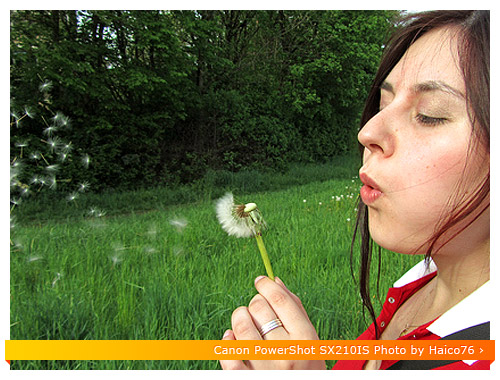
Canon SX210 IS Continuous Mode - Dandelion

Wildlife – Animals come and go so fast. When you’re in continuous mode you can snap off a series of photos and a capture all of the movements the animal makes. This is especially helpful with fast moving subjects like birds and other small wildlife.
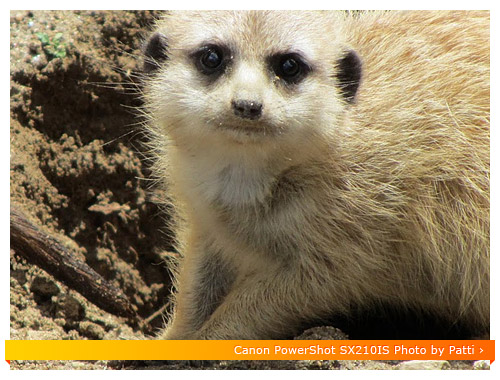
Canon SX210 IS Continuous - Animal

Events or Festivals – When photographing people at festivals or events, you usually only have one chance to take that perfect photo. Continuous mode will allow you to capture a few extra images, ensuring you get the best possible shot.

Babies – Little children and babies are known for their priceless expressions. Getting them to do the same expression over and over again is next to impossible. One idea is to leave the SX210 IS in continuous mode ‘on’ during the day. This way if your baby is doing something cute, you can quickly snap off a bunch of photos and later find the one that makes your heart melt.

Continuous Mode Tips for the PowerShot SX210 IS

Tracking your subject in continuous mode can be very difficult. The LCD screen will capture the image and then reappear each time a photo is taken. One trick, is to hold the SX210 IS as far away from you as possible. Just like aiming a gun, close one eye and position your subject just above the top of the SX210 IS. If you can keep them just above the microphone as they move around, you will have an even better chance of framing your subject.
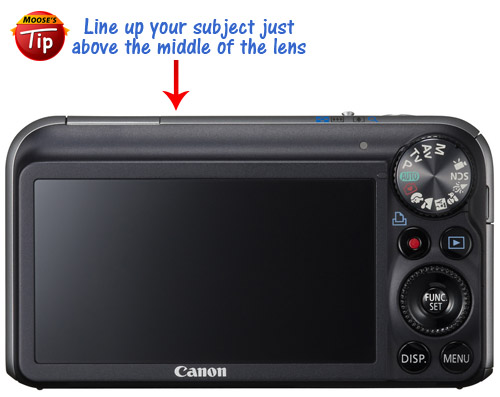
Canon SX210 IS - Continuous Tracking

Continuous mode can eat up a lot of memory card space. I suggest that if you plan on doing lots of continuous shooting to use a 16GB SDHC memory card (see my recommendations here).

If you’re using flash, the speed of continuous shooting will slow down. The SX210 IS has to recycle the on-board flash before it fires again, so this delay will reduced the amount of frames per second you can capture. If the scene is dark, raise the ISO or switch over to Low-Light mode which can be found on page 56 of the SX210 IS manual (see here). Non-flash pictures give off a more natural look anyway, so give it a shot!

Jump back to the Canon SX210 IS quick reference for more helpful tips and resources. Happy Shooting!

P.S. You can reward me by using your shutter clicking skills on the Google +1 button. In return, I'll cook up more tips and tricks to share with you. Thanks for your support! :)
Add a Comment or Ask a Question
Ask me stuff on Google+ Just type +Moose Winans into your Stream box along with your comment or question.
Ask me stuff on Facebook Just click the Like button on my facebook page and then post a comment or question to my wall.
Ask me stuff on Twitter Just start your tweet with @MooseWinans followed by your comment or question.


63 Responses to “Continuous Shooting Tips for the Canon SX210 IS”

  1. RICK says:

    Can you go over the FOCUS MODES on the sx210..they are a little confusing to me…which is best for what type shooting and so on..thanks

    • Moose says:

      Rick,

      If I can find some time, I’ll try to knock out a post on focus modes. In the meantime, you can reference pages 82 to 84 for more info. Happy shooting!

      - Moose

  2. RICK says:

    does the sx210 have a BRACKETING feature or a LAPSE TIME shutter feature ?….other than those two features it seems to be a great camera…have taken about 50 images and every single one was a good one…and i dont even know how to use it yet…thanks for all your info here…is this the only camera that you give help on ? if not ..then you are a busy man….thanks

    • Moose says:

      Rick,

      The SX210 IS doesn’t come with an auto-bracketing or time lapse feature. You can adjust the exposure compensation in 1/3 stop increments by pressing the up arrow and turning the dial. You can reference page 70 of the Canon SX210 IS manual for more info. Happy shooting!

      - Moose

  3. Rainboww says:

    Hi Moose,

    From the last day’s trip, I was so pissed off with some of my photos. I tried to capture a dancing woman but unfortunately I end up never getting a clear photo of her. How to catch a clear shot of a moving object during night time at outdoor?

    Thanks again Moose. Fairly, I was happy with my shots based on your tips.

    • Moose says:

      Rainboww,

      I’ll give you the short answer…it’s not possible to get a perfectly clear shot of fast action in low light with the SX210IS. You can “freeze” subject movement by shooting in shutter priority (Tv) and selecting a minimum shutter speed of 1/500. However, the SX210IS will have to use a super high ISO in order to get an accurate exposure. Higher ISO’s will lead to image noise and loss of detail in your shots. If you’re serious about improving your low light shots, you may want to consider upgrading to an entry level DSLR. DSLR’s have much larger sensors and produce cleaner looking images at higher ISO’s.

      - Moose

  4. Rainboww says:

    Hi Moose,

    It’s been a long time since I’ve posted here. It’s glad to be back and now with new question in mind.

    Tomorrow, my friends and I are going for a trip to a famous desert here in UAE from afternoon till evening. Please advise me on which settings should I use to take fantastic photos of the scenery as it might be our first and last time to visit the place. Hope I’d be able to read your answer before we head off!

    Thanks a lot again Moose!

    • Moose says:

      Rainboww,

      Shoot in aperture priority mode (Av) and select an aperture of f/8. If you’ve got enough light, select an ISO of 100…otherwise leave it on Auto ISO. Higher f/numbers will help put everything into focus, which is great for shooting landscapes. Have a great trip!

      - Moose

  5. ferada innes says:

    hey, moose, i’d like to give you a bunch of thanks for your tips, they help me a lot. i just bought the 210 and i am so the beginner, but i have a problem regarding the shutter speed. we know that 210′s shutter speed ranges from 1 to 1/3200sec, and if i’m not mistaken (which is always done by the beginner, teheee ;p) the shutter speed enables us to capture fast-moving subject, so is this shutter speed similar to the continuous shooting mode? if not, i’m kindly asking your help to write tips about the shutter speed adjustment, as i have no idea to even locate the term in the camera menu. thanks :D

  6. james says:

    Moose, could you point me in the right direction with the movie mode please : when I shoot movies the focus changes constantly, when I pan around or when I zoom in/out. How could I fix this problem?
    thanks in advance!

    • Moose says:

      James,

      The few times I’ve experimented with movie mode on the SX210 IS, I encountered the same issues. I had some luck using AF lock which can be found on page 84 of the Canon SX210 IS manual. Happy shooting!

      - Moose

  7. David Camrass says:

    Hi Moose.
    Just got the SX210 is and have been going over the different things that can do with the camera which seems a lot! A problem to try and remember it all!
    Your website is great and thank’s for all hints and tips which is a great help.
    As want to speed up time between shots Your advice – “shot speed can be improved by eliminating the quick review” have gone over the menu but not found how to cancel.Your help please.
    Many Thank’s
    David

    • Moose says:

      David,

      You can disable image review inside the setup menu. There are a couple options: 2 sec, 10 sec, Hold and Off. You can read more about it on page 150 of the SX210IS manual.

      - Moose

  8. stephanie williams says:

    I have a question, I read your comment about getting the blurred background and i tried it, and it doesnt work for me..in the manual it says all you have to do is put in on the portrait scene, but that doesnt work either for me, another thing is i cannot get it to take more than one photo at a time, i reset the factory settings when i first got it, but havent done it since then, and everytime i take a photo in continuous shooting, it comes out blurry and its only one photo, can you help please

    • Moose says:

      Stephanie,

      1. Try rotating the mode dial to Av (aperture priority mode) and select the lowest possible f/number. The lowest f/number at wide-angle is f/3.1 and the lowest f/number at telephoto is f/5.9. Then make sure your subject has some distance between them and their surroundings. Position your subject so that the background is far away. Next zoom all the way into your subject. You may have to back up a few steps if you’re too close. By doing all of the above you’re creating a shallow depth of field which shorten the area in focus, creating the blurred background effect that you’re after.

      2. If you’re following all of the instructions mentioned above and you’re not able to get more than one exposure, then I would try calling Canon support. Remember, when shooting in continuous mode you need to hold down the shutter button as the camera captures its burst of images.

      - Moose

  9. Pinky says:

    Hey, i just bought a SX210 IS and its great but i can’t seem to figure out how to get blur backgrounds.. I think it has something to do with Aperture but i have no idea how do it functions. I would like to focus on a subject and get blur backgrounds.

    • Moose says:

      Pinky,

      You can create a shallow depth of field by enabling aperture priority mode (Av) and selecting the lowest available f/number. Then zoom into your subject as much as possible. If you have to, take a few steps back so you can apply even more zoom. The longer your focal length, the shorter your depth of field will become. Happy shooting!

      - Moose

  10. amir says:

    Thanks for your all tips, but could you please tell me which mode is more easy to get good photo with good quality? I am not professional i just want to have always good photo.
    Thanks

    • Moose says:

      Amir,

      There isn’t one mode that will give you the “best” image quality in every given shooting situation. I would start experimenting with some of the scene modes which are designed to give you the correct settings for that type of shooting situation (beach, portraits, low light etc…). You can find a step-by-step tutorial on page 54 of the SX210 IS manual.

      - Moose

  11. jenn says:

    Dear Moose, this is a great website for helpful tips. One thing I cannot find an answer to is how to keep my lcd screen from going black while using continuous mode to shoot my subject (specifically my daughter playing soccer). When I use continuous mode to shoot her running on the field and in between shots, the lcd goes black, I can’t find her on the screen when it goes to take another shot. For example, I am holding down the button to take the continuous shots, and I end up taking photos of other players, the sky, the empty field or nothing at all since I can’t see her and I’m trying to guess where she is on the lcd screen. Does that make sense?
    Thanks for any help you can provide.

    • Moose says:

      Jenn,

      This is an unfortunate issue will ALL compact cameras, not just the SX210 IS. Digital SLR’s are the only cameras capable of a continuous view during burst mode. They have a dedicated viewfinder which is separate from the image sensor. On compact cameras, the image you’re viewing on the LCD screen is the same image being capture on the internal image sensor. The best advice I can give you is to practice panning the camera in the general direction that your daughter is running…you should end up with a few keepers. Best of luck!

      - Moose

  12. Jo says:

    Hi,
    I’ve just received my sx210 but I’m struggling. I’m a beginner so wanted the mix of auto and manual functions, but no matter what function I use I always seem to get the orange shaky camera icon coming up. Even in broad daylight.

    I’ve never had this problem with any other canons. Any ideas how I can get round it or what I could be doing wrong?

    If I’m going to have to rely heavily on a tripod to get clean images I don’t think this is the camera for me.

    I’d be really grateful for any top tips or advice on this.
    Cheers!

    • Moose says:

      Jo,

      If you’re struggling to get a sharp shot in bright daylight, then your in-camera settings may be off. Try doing a factory reset which can be found on page 50 of the SX210 IS manual. Once you’ve done that, enable program mode (‘P’) and try taking a few test shots in bright light to see if that’s corrected your problem. You might also try experimenting with the different image stabilization settings which can be found on page 152 of the manual.

      - Moose

    • Jo says:

      Legend. Thank you so much. I’ll give it a go

  13. Ranjit says:

    Dear Moose,
    I brought my Canon powershot sx210is some 2 months back & tried all the things given in the manual, except one or two things that i couldn’t do & that are – 1. How to take good quality photos in macro mode or very close-ups of say – a flower or an insect & 2. i find it difficult to transfer my photos from camera to a CD or DVD.
    Please can you hel pme out?
    Apart from these two things, I find this camera very good & it takes good pictures.
    Thank you.

    • Moose says:

      Ranjit,

      Macro mode : Select the macro shooting mode (flower icon) inside the SX210IS menu. Macro mode will allow you to get up to 2 inches away from your subject. If you try to get any closer than 2 inches, the SX210IS will fail to focus. I recommend using a tripod so you can get your hands off the camera and use them to position or steady the subject.

      Transferring images to CD/DVD – You cant transfer images to CD/DVD by using a free burning program like Nero BurnLite.

      - Moose

    • Ranjit says:

      Thanks a lot Moose for prompt reply. I will try things in macro mode now.

      Where on the net can I see the photos taken in macro mode with this particular model of the camera?

      Thank you very much!

  14. Sanjeev says:

    Hello!
    Ive just purchased this camera and it gives me great pictures. Does it have the Color Extract or Color Accent Function that for example allows us to completely change the background to B & W, with a central colored image of the person? Do let me know how to go about htis function, if in case it does exist on this camera- it is there on the previous ISUS series…
    Thanks
    SM

  15. NNR says:

    Hi Moose,

    I got this Canon SX210 IS. I have set the continuous shot, but whn I hold the shuuter button either full or half, it does not do a contunios shots. It takes 1 pic, waits for it to save and then on.. will not trigger any.
    Please let me know if I have to do any settings?

    NRN

    • Moose says:

      NNR,

      Sound like you have some settings enabled that are conflicting with the burst mode. I would first reset your camera to the factory default and then try enabling burst mode. It’s possible you have flash enabled which is limiting you from taking a burst of photos.

      - Moose

  16. Robert says:

    Just bought the Canon power shot and I love it. It takes really great photos and I and happy with the decision. My question is what is the best way (easiest) to take the background out of focus and keep the subject sharp? Aperture and shutter speed is Greek to me but I know there is a manual mode to select those settings, any suggestions on what to set them to to get my subject sharp and the background out of focus. Thanks!

    • Moose says:

      Robert,

      Try rotating the mode dial to Av (aperture priority mode) and select the lowest possible f/number. The lowest f/number at wide-angle is f/3.1 and the lowest f/number at telephoto is f/5.9. Then make sure your subject has some distance between the background. If you’re taking a portrait up against a brick wall, have them walk towards you a few steps. Next zoom all the way into your subject. You may have to back up a few steps if you’re too close. By doing all of the above, you’re creating a shallow depth of field which will limit the area that is in focus, creating the blurred background effect that you’re after.

      - Moose

  17. Linda says:

    I just purchased this camera and will be taking it on an Alsakan cruise in 2 weeks. Any tips for shots from the ship? One of the reasons I purchased this camera is the 14x zoom. However, I am having trouble keeping my arms steady when shooting with this setting. I have a tri-pod, but it may not always be available for use for spantaneous shooting or on hikes, etc.
    Thanks.
    Linda

    • Moose says:

      Linda,

      Yes the 14x zoom will be fantastic from the cruise ship deck. Outdoors in brigh tlight you shouldn’t have a problem shooting in Auto mode and still “freezing” the subject. If a passing cloud hovers in front of the sun, you may need to switch to Shutter priority mode (S) and select a shutter speed of 1/500 or higher. The faster shutter speeds will help minimize camera shake and also “freeze” and movements your subject might make while taking the photo. If you enter this mode, make sure you enable Auto ISO so the SX210 can properly expose the scene.

      If you try shooting at dusk, dawn or night I would not even try shooting at full telephoto as the shutter speed will be so slow that it will be impossible to hand hold. If you enable shutter priority in these low light scenarios then your photos will come out too dark. Stick to using a tripod in low light and only shoot stationary subjects like landscapes. That should get you going in the right direction! Have a great trip!

      - Moose

  18. Ike says:

    I just purchased this camera earlier this week. I’m coming from a Kodak v1253 and so far I am not getting good shots with the SX210 IS. My images aren’t sharp, soft focused and I’m pretty disappointed. Any suggestions, settings or tips?

    • Moose says:

      Ike,

      Generally speaking the SX210 IS does fantastic job outside in bright light. One thing you may want to try is changing the AF frame mode to ‘Center’. Just half press the shutter with the rectangle over your subject. Continue holding the shutter half-way and then re-frame your shot. Once you’re happy with the composition, snap away. If your subject is blurry then there’s not enough light to “freeze” the movements. In order to fix this you can increase the ISO or switch over to shutter priority mode (S) and select a shutter speed of 1/500 or higher. If you use shutter priority mode, just make sure you set the ISO to auto. This should get you started in the right direction. Let me know if you have any other questions.

      - Moose

  19. Christine says:

    Great advice again Moose!!

    I got the SX210 today! So far it’s great, even took photos of the girls indoors & it seems fine. I need to get use to the little pop up flash, my old powershot SD850 didn’t have that. I like the sturdier lens on the SX210. I broke the one on my SD850 hence the need for a new camera. Thanks again for your help!

    Christine :O)

  20. Christine says:

    Thanks Moose!! Huge help although the final decision was hard, it’s all important to me :O) I have an Canon EOS Rebel as well, but it’s too bulky when I’m lugging around 2 little kids! I think I’ll go with the SX210. One review said “it’s a slow performer, not uncommon in the pocket long zoom category: slow to start-up; slow shot-to-shot; and slow in image playback. If you want to take candids of kids or pets with this camera, be sure and pre-focus or you may miss the shot.” If I don’t stop looking at reviews I may change my mind again, I’m sure I’ll be happy with this camera! Unless of course you write back & say well maybe the SD4000 would be better ;o)

    Thanks for your help!!
    Christine

    • Moose says:

      Christine,

      Glad the info helped! As for what the reviewer said…everyone interprets speed differently. If the reviewer is comparing the SX210 IS to a digital SLR then they’ll notice huge differences in focus speed, focus accuracy, start-up, etc…I feel that the SX210 focusing system is very capable, and in most situations it acquires focus quickly and accurately outdoors in bright light. Start-up could be faster, but it’s not a deal breaker, and shot to shot speed can be improved by eliminating the quick review each time you take a photo.

      The only thing I would caution you about is low light performance. Whenever you go indoors, I would try to use your Canon Rebel whenever possible as it will hands down take much better photos in low light. Outdoors in bright light, the SX210 IS will be a fantastic option…giving you portability, a long zoom range and colorful photos!

      - Moose

  21. Christine says:

    I am trying to decide between the PowerShot SX210 IS or the PowerShot SD4000 IS. The SD4000 continuous shooting is faster 3.7fps, but is only10 megapixel compared to SX210 14.5. Plus the shutter speed is faster on the SX210 so I’m just not sure which camera to get. Do you think the difference in continuous shooting will make that much of a difference?

    Thanks!

    • Moose says:

      Christine,

      I’d be glad to help you in your decision…

      1) I wouldn’t worry about the megapixel difference. Anything above 6 megapixels is capable of prints up to 11×17. In fact, lower megapixel image sensors usually do better in low light with reduced image noise, so this might actually be a plus for the SD400IS.

      2) You’ll notice a big difference in continuous/burst mode shooting. The SX210 IS only shoots at 0.7 frames per second, while the SD4000 IS shoots at 3.7 frames per second.

      In deciding between the two cameras, you should look at the zoom range and low light ability. The zoom range is 392mm on the SX210 IS and 105mm on the SD4000 IS. The SX210 IS will allow you to zoom in much closer to your subject. As for low light ability…the SD4000 IS has an aperture range that starts at f/2.0, while the SX210 IS has an aperture range that starts at f/3.1. So what do these numbers mean to you? Well in low light, you’ll be able to get faster shutter speeds at lower ISO’s with the SD4000 IS which means your low light photos will “probably” turn out better than those from the SX210 IS. The faster shutter speeds will eliminate camera shake and subject blur, ensuring super sharp photos.

      As of August 10th, 2010…the Canon SX210 IS can be purchased for about $300 and the Canon SD4000 IS can be purchased for about $320, so there’s not a huge difference in price.

      If I were you I would decide which feature is most important to you and go with that camera. Hope that helps!

      - Moose

  22. Rainboww says:

    Thanks for the advice Moose. Can’t wait to try it out outdoor. You’ll be hearing from me then on my learning in few days time.

    See yah!

  23. Rainboww says:

    Hi Moose, thanks a bunch for the help. I’ve made it finally. I realized it only comes with the right settings which I got tips for from few canon websites like yours. But still I haven’t tried yet taking outdoor shots at night time with correct settings. I will show you sample previous photos of mine which resulted into soft-looking ones.

    On focal length, well thanks for the infos about that. It doesn’t give me much of a big deal though being not able to determine so.

    Another question: How to achieve a portrait photo with a blurred background? This really challenges me a lot! Please gimme tips.

    • Moose says:

      Rainboww,

      Sounds like you are learning a lot…keep it up! :)

      To answer your question, the best way to get a portrait with a blurred background is to zoom all the way in to your subject while in Aperture Priority mode. This may sound odd, but it works. When fully zoomed, the depth of field is much smaller and allows the SX210IS to focus on your subject and not the background. Make sure you rotate the SX210IS to Av, which is Aperture Priority mode and select the lowest f-number available (f/5.9). Try to position your subject as far as possible from a background. So if your subject is up against a brick wall, have them walk towards you and create some distance between the background. This method works best outdoors in bright light. If you try doing this indoors or in light light conditions you’ll probably encounter blurry photos. To minimize image blur when indoors, try using a tripod and make sure your subject remains very still during the portrait.

      - Moose

  24. Rainboww says:

    How to use or identify the “focal length”?

    • Moose says:

      Rainboww,

      That is one feature I would love to have in all compact cameras. Unfortunately, most compact cameras don’t come with an easy way to determine focal length. Many times the only way you can determine the focal length of a photo is to view the exif data in an image editing program like Picasa.

      - Moose

  25. Orange Sunshyne says:

    Why didn’t this camera come with a user manual?
    I have owned several Canons including the SD1000 & SD770IS, and each of them had a user manual.
    This seems really cheap for Canon to do this.
    I travel frequently, and the small bookstyle manuals were easy to pack to get the most out of the cameras.
    I can print the manual out, but its hard to look up what you need in a hurry and keep the sheets in order.

    • Moose says:

      Orange,

      I agree that it’s very cheap…it’s similar to when memory cards came standard with every camera. Now you have to buy the memory cards separately. If you’d like, you can order a printed manual (small bookstyle) from Canon for around $10. If you tell them that you thought it came supplied with your SX210 IS, they might ship it to you for free. Here’s the number for Canon USA: 1-800-652-2666

      - Moose

  26. Rainboww says:

    Hi Moose,

    I got the cam few weeks ago. I have been trying get sharp photos but once I uploaded the photos they seemed don’t look sharp at all on laptop screen. I believe this cam offers a lot but why I can’t see sharpness on most of my takes? Please help me. I want to make the most out of this cam.

    • Moose says:

      Rainboww,

      Could you send me an example? Either send me a link to one of your photos (if you have them uploaded somewhere like Picasa or Flickr)…or you can email me a photo at moose@cameratips(dot)com

      - Moose

  27. Lori says:

    actually, how do I make the viewing portion the entire size of the space on the back. Seems like a waste to have a wide “review” area and only use a portion of it.

  28. Lori says:

    How do I make the picture the entire size of the camera viewing portion on the back?

    • Moose says:

      Lori,

      Great question…try zooming into the photo while in playback mode. When you’re reviewing pictures, you can use the zoom toggle to get in closer to your photo. Thanks for stopping by!

      - Moose

  29. Loria says:

    Moose- You are the BEST! Yes, this helped a lot. I read the manual and another site, but no one suggested going to the P mode before following the rest of the directions. Awesome. Can’t wait to try it out outside.

    While I “have” you, can you tell me what icon on the left margin is. It is just below the battery icon and looks a bit like a camera with an arrow on top… or maybe like an old fashioned schoolhouse.

    • Moose says:

      Loria,

      Glad I could help…I think what you’re seeing is the “Camera Orientation” icon. The SX210 detects f it is being held horizontally or vertically and “marks” each image as vertical or horizontal when you are viewing the pictures on your camera or computer.

      - Moose

  30. Loria says:

    I just bought the sx210. Even though I have followed the instructions, I cannot figure out how to use continuous shooting. I do exacty what is specified however, after pushing func-set I do not see continuous shotting options. I know I am missing something, but I just don’t see the icon or words. Help. One of the reasons I bought this thing is to use coninuous shoot mode.

    • Moose says:

      Hey Loria,

      Finding features inside of a menu can be tricky, lets try this…

      1. Rotate the mode dial to the P shooting mode. If you’re in AUTO mode, you won’t be able to see the burst options.
      2. Press the FUNC/SET button.
      3. Scroll down the page until you see the Rectangle icon labeled Drive Mode.
      4. Press the FUNC/SET button again to access the burst menu.
      5. Choose one of the burst mode options and press the FUNC/SET one more time to activate it.

      Let me know if that helps!

      - Moose
      3. Scroll down the page until you see the “Drive Mode” option

  31. Liz says:

    I just purchased this camera, I’m anxious to get it. Thanks for the great tips!

    • Moose says:

      Hey Liz,

      Excellent choice, you’ll really love this camera! I’m working on a few more guides, so stay tuned :)

      - Moose

Leave a Reply